
A field that appears only when it is needed: conditions on the attributes of customers, categories and content
In System > Attributes an attribute can show, or become required, only when other fields hold certain values, for customers, addresses, categories, CMS pages and blog, with the same rule on the storefront and in the API.
Every extra field in a registration form is a customer who leaves before the end. But a field that a company needs, a VAT number or an SdI code, means nothing to a private customer, and until now the only choice was to show it to everyone or remove it for everyone. Pull request #1819 adds the third option: the field appears only when it is needed.
What it adds
The attribute page under System > Attributes gains two sections, When the Field Shows and When the Field Is Required. The first lists the conditions that make the field appear, the second those that make it required, and every condition reads the value of another field, a standard one such as the country or the customer group included.
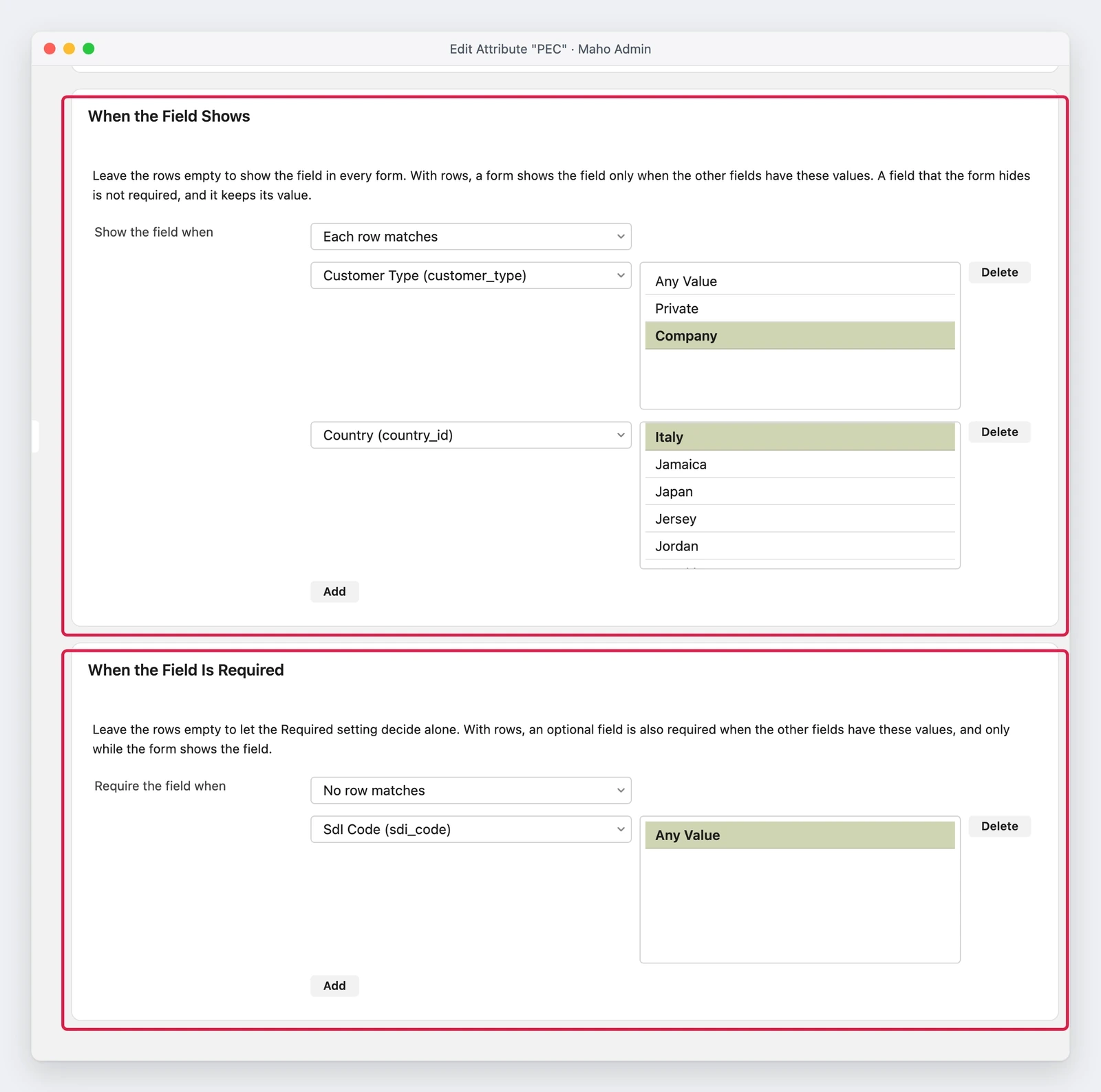
It works on six kinds of record: customers, customer addresses, categories, CMS pages, blog posts and blog categories. The rule applies in three places at once, with no code: in the admin forms, in the storefront forms (registration, account, address book, checkout) and in the API, which refuses a missing required value as the page does. A hidden field keeps its value, and that value is not printed in the rendered addresses, the emails, the PDFs or the attribute table of the storefront.
Conditions combine with AND, OR, NOT and XOR, and there is a special value, Any Value, that means “this field holds something”: it links one field to another without listing every possible value.
Why it matters
The examples the pull request writes down are the ones a store actually asks for.
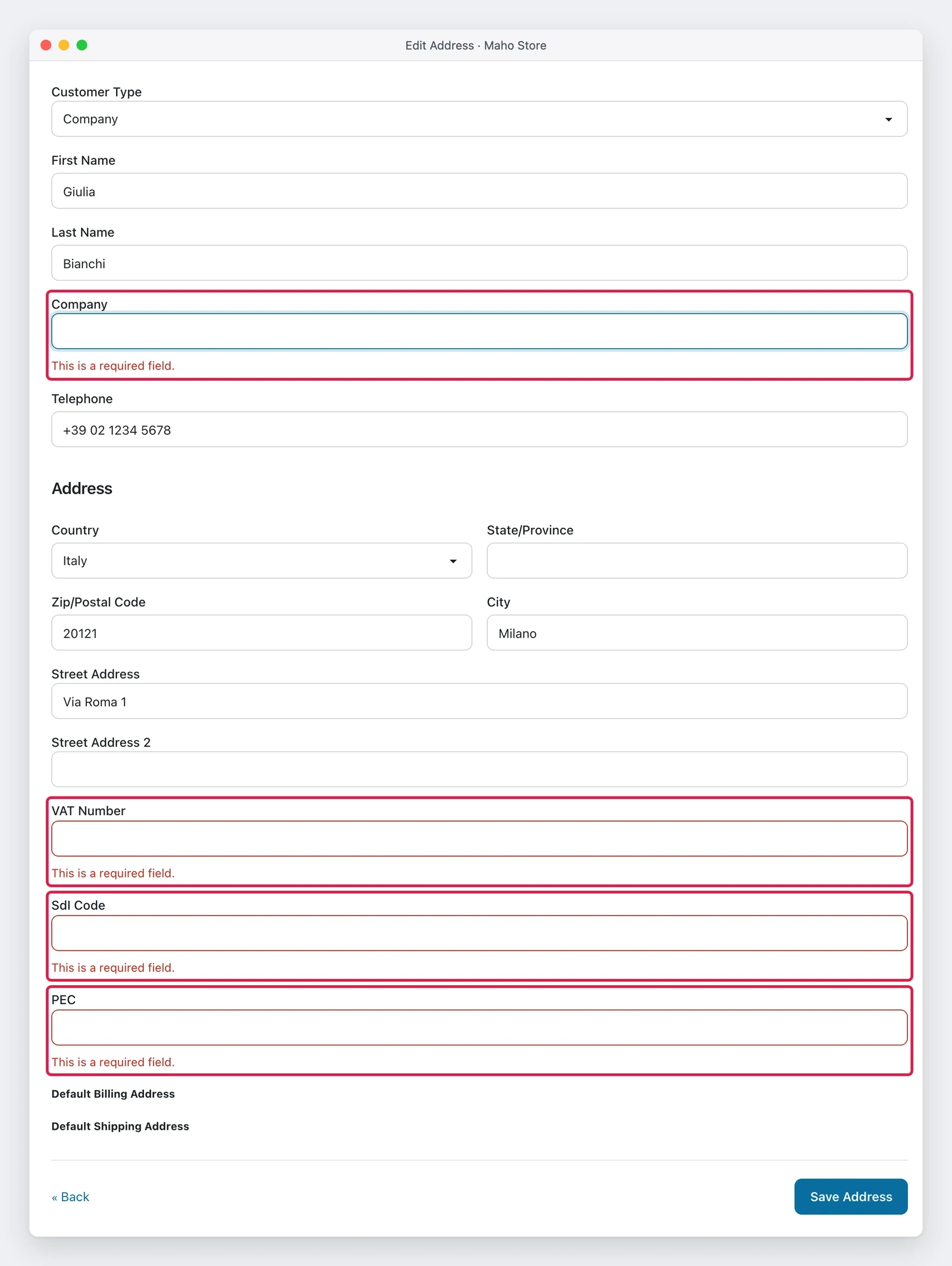
An Italian company gives Company, VAT Number and one of SdI Code and PEC, and one of the last two is enough: the required rule of PEC reads SdI and the other way round, so the customer fills one and the mark on the other disappears while typing. A private customer, or a customer in another country, never sees those fields.
Need it today? For the Italian fiscal fields MageMEGA wrote empiricompany/maho-italian-fiscal-fields, an extension that adds the Customer Type select with tax code, PEC and SdI code to the addresses and the checkout, with visibility tied to the country and the customer type, the format checks on the VAT number, the tax code, the PEC and the SdI code, and the values carried through to the orders, the emails and the PDFs.
A field reserved to the Wholesale group, a tax exemption certificate for instance, shows only to that group, and a condition on an address can read the fields of the customer. On a category, Brand Logo appears only with Is Brand set to Yes. On a blog post, the event date appears only when the post type is Event.
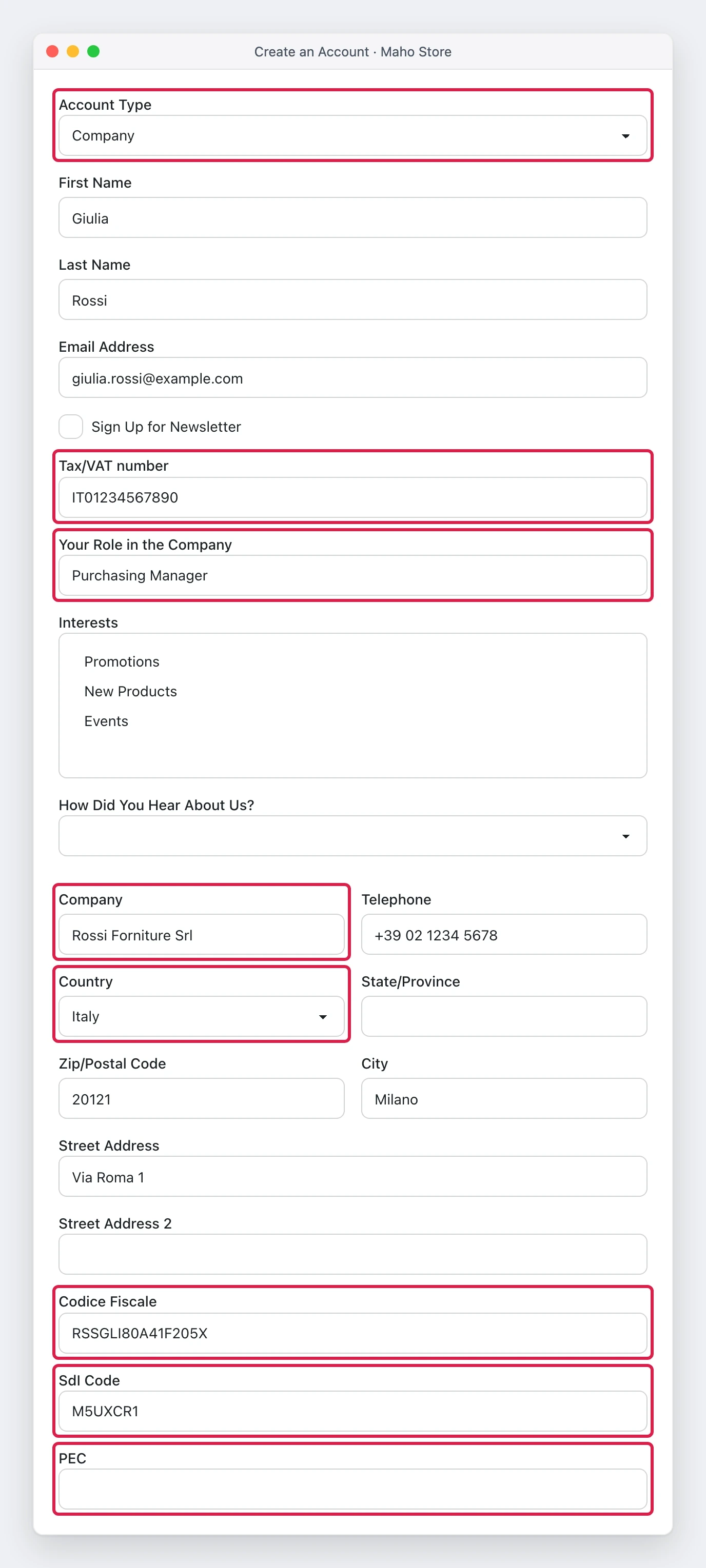
The most interesting case is registration: an Account Type at the top of the form, with a Sort Order lower than every standard field, decides what the customer sees. A company fills its business name, VAT number, tax code and the e-invoice fields, a private customer sees the date of birth, and the address fields of the same page follow the account type while the customer types.
What it needs
- Nothing to install: conditions are set from the attribute page, and an attribute without conditions behaves as before.
- One field at a time: an attribute that depends on another cannot have a condition of its own, so no chains are created that are hard to follow. A required rule can read fields that read other fields.
- The fields it cannot read: a file, an image or a long text field cannot be a condition, because its value does not live in one input of the form.
- Registration with an address: an address condition is useful at registration only with the new Ask for an Address at Registration setting on, under Customers > Customer Configuration > Create New Account Options, off by default.
- For whoever writes a theme: a template that reads a raw value has to ask whether the field is hidden, as the developer documentation says.
What can still change
The pull request is merged but not in a release, and the limits it declares hold for how it is today. A field on another tab of an admin page reads the saved value of the field that decides, not what is being typed. At checkout an address condition reads the customer fields the cart already holds, so it does not follow a guest while typing. The admin address forms of an order show the field but do not mark it required, though the check still runs when the order is placed. Products stay out: the product attribute page has no condition editor. Deleting an attribute that a condition reads is refused, so no rule is left broken. The JavaScript part has no automated test yet: it was checked by hand in the browser, with the steps of the screenshots.
The same work fixes a date field that was wrong: Date of Birth printed the letters of the date
format instead of the three selects and sent that text as the date, and it is now one date field that
sends YYYY-MM-DD in every locale.
Status
The snapshot is from 21 November 2026. The pull request was merged on 14 November and is not in a release yet: whoever wants to try it finds it in the repository documentation, and whoever waits for a version finds it in the next patch or the next release, when they come out.
Text prepared with the help of AI and checked against the source before publication. It can still contain mistakes: if you find one, report it.Read the manifesto
Source: MahoCommerce/maho#1819
Does your store still sell?
Tell us where you are starting from: we reply with a first assessment, no strings attached.
Ask for the store assessment