
Shipping rates from an API: a bridge instead of one module per carrier
Since 26.3 ShippingBridge sends cart and address to a JSON endpoint and shows the methods that come back, with no module to write.
Every carrier wants its own module, every module wants its own update, and every store that changes a contract ends up installing yet another package to compute a price. ShippingBridge takes another road: the calculation belongs to an API, and Maho just sends the cart with the address and shows the methods that come back at checkout. Since 26.3 the bridge is in the core, so there is no code to write.
How it works
The flow is short. The customer opens the checkout, Maho collects rates from the active carriers, and the
bridge is one of them: it sends a POST request with Content-Type: application/json to the configured
endpoint, waits for the answer, and the methods it receives join the list next to the others.
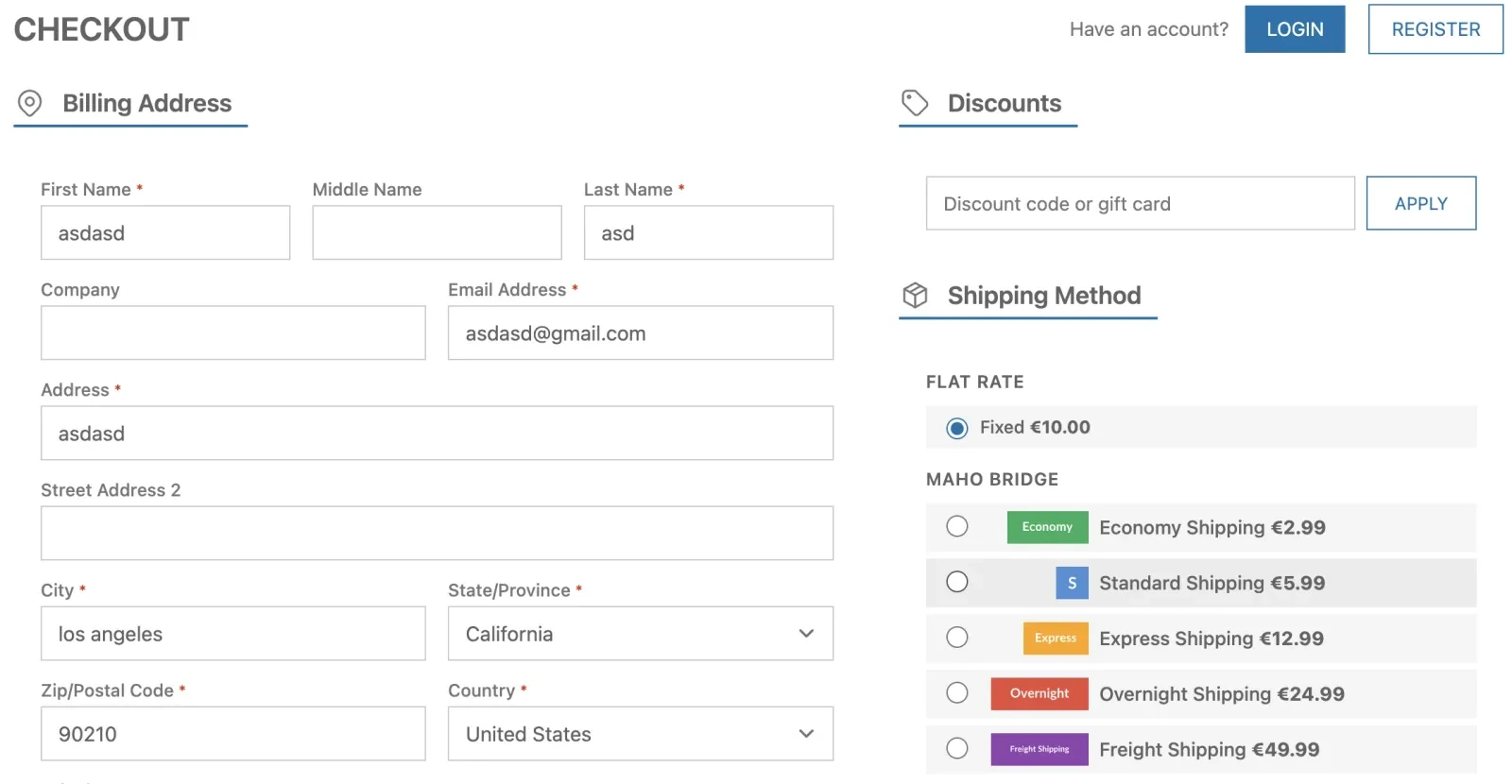
On the other side you can put whatever you like: a microservice, a serverless function, the warehouse system, an aggregator querying three carriers in parallel. The contract stays the same, so changing provider does not mean changing the store.
The configuration
System > Configuration > Sales > Shipping Methods > Shipping Bridge. The fields that matter:
| Setting | What it does | Scope |
|---|---|---|
| Enabled | activates the carrier | Website |
| Title | name of the group shown at checkout | Store View |
| API Endpoint URL | the address Maho posts to | Website |
| Authentication Type | none, Bearer token or custom header | Website |
| Auth Token | the token value, encrypted in the database | Website |
| Custom Header Name | header name when using custom authentication | Website |
| Request Timeout | seconds to wait, sixty at most | Website |
| Additional Product Attributes | product attributes added to the payload | Website |
| Debug Mode | writes request and response to var/log/shipping_bridge.log |
Website |
| Displayed Error Message | what the customer reads when the method is unavailable | Store View |
The timeout is capped at sixty seconds, which is a sane choice: a checkout waiting a minute for a rate is a lost checkout. When the API is slow, the fix belongs on the other side.
What the API receives
The payload carries the cart with lines and totals, the shipping address, the currency, the store and the
customer. Each line holds sku, name, qty, weight, price and row_total, plus the extra attributes
you selected in the configuration.
Single and multiple select attributes arrive with value and label, so the function computing the rate does not have to translate codes:
{
  "cart": {
    "items": [
      {
        "sku": "shirt-red-m",
        "qty": 2,
        "weight": 0.5,
        "color": { "value": "25", "label": "Red" }
      }
    ],
    "totals": { "subtotal": 59.98, "weight": 1.0, "qty": 2 }
  },
  "shipping_address": { "postcode": "97201", "country_id": "US", "region_code": "OR" },
  "currency": "EUR",
  "store_id": 1,
  "customer": { "group_id": 1, "group_code": "General", "is_guest": false }
}
For configurable products the payload carries the parent name and price, the SKU of the chosen variant, and the super attributes always resolved from the child.
What it must answer
A JSON response with a methods array. Every method needs code, title and price, and may carry
cost, description and logo.
{
  "methods": [
    { "code": "standard", "title": "Standard (5-7 days)", "price": 5.99, "cost": 3.5 },
    { "code": "express", "title": "Express (1-2 days)", "price": 14.99, "cost": 10.0 }
  ]
}
The failure rules are already written and worth knowing before integrating: a status other than 2xx, invalid
JSON or a missing methods array produce a logged error and no methods shown; a single method missing a
required field is skipped with a warning while the others stay visible. When there are no options, return an
empty array.
🌉 Note from the bridge: the difference between an error that stops everything and a method that vanishes is a design choice. Better one method less than a checkout that will not open.
When it is actually worth it
The bridge pays off in three cases. The first is logic no standard module can express: zone based rates, weight tiers, customer group discounts, rules on product categories. The second is the integration with an ERP or a warehouse, where the rate depends on where the goods really are. The third is aggregation: one endpoint querying several carriers and returning a single list.
It does not pay off when one carrier with table rates is enough, because there the bridge adds a service to maintain for a calculation the core already does.
🌉 Note from the bridge: one more bridge is one more service to watch. If the serverless function wakes up cold on the first checkout of the morning, the customer waits, and the store gets the blame.
The order of work
- Build the endpoint that accepts the payload and answers with
methods, even with a flat rate, to check the whole loop. - Turn Debug Mode on while integrating:
var/log/shipping_bridge.logshows request and response and removes all guesswork. - Add the product attributes the calculation needs, remembering that more data means a slower service.
- Test the empty case, the failing API case and the incomplete method case: those are the three ways a checkout breaks in production.
- Turn debug off before going live: it fills disk space and writes customer data into logs.
Text prepared with the help of AI and checked against the source before publication. It can still contain mistakes: if you find one, report it.Read the manifesto
Does your store still sell?
Tell us where you are starting from: we reply with a first assessment, no strings attached.
Ask for the store assessment