
Orange, yellow and green at once: filters that add up
Since 26.9 layered navigation accepts several values on the same attribute: OR inside a filter, AND across filters, off by default.
A shopper wants something bright and has not decided between orange, yellow and green. In a classic layered navigation those are three searches: pick a color, look at the results, go back, start again. Since 26.9 the same filter takes several values at once, so the three colors fit in a single click and the store shows everything that is orange or yellow or green.
One value at a time
Layered navigation in Maho, like the Magento 1 one it comes from, works on a single value per attribute. In the color block the first click applies the filter and the second replaces the first, so seeing orange and yellow together meant changing category or giving one of them up. Multi-select filtering was one of the most common reasons to install a third-party navigation module.
Since 26.9 the behavior is a per-attribute choice, and it ships off: a store that does not turn it on sees no difference. Turned on, the filter adds up the values of the same attribute and keeps intersecting different attributes.
🎨 Color note: inside a filter it is OR, across filters it is AND. Out of the formulas: orange or yellow or green, all of it in the right size.
Where it lives
Catalog > Attributes > Manage Attributes, then the attribute, Frontend Properties tab. The field is Allow Multiple Selections in Layered Navigation, and it starts at No.
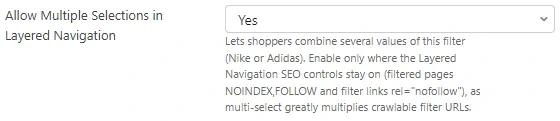
The field applies to the attributes navigation already uses: input type Dropdown with Use In
Layered Navigation set to something other than No. A free text field has no options to add up,
so it behaves as before. Behind the field there is a new column, is_filterable_multiple, on
catalog_eav_attribute, set to 0 on every existing attribute. An upgrade does not change the
behavior of a store that leaves that dropdown alone.
Three colors, one result
With the option on, the filter block works as before while a single value is chosen. The second click changes one thing: the new value joins the one already selected instead of replacing it. Every selected value becomes a chip with its own cross, and the chips sit above the filters, one per value.
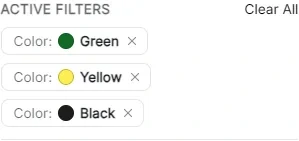
In our test store, three colors selected on apparel lead to 18 products, and the list reads at a glance: black trousers, black dresses, green t-shirts, black sunglasses. Nobody has to rebuild from memory what the previous search showed.
The option list stays where it is: values already chosen leave the list and become chips, the others stay clickable and their count reflects the other active filters, not the filter being used. Adding size M after three colors narrows the result to the green, yellow or black products available in M, with the size applied on top.
🎨 Color note: a filter that adds values up must not hide the options. If the other choices disappeared, a shopper could not add one without first removing the value just picked.
URLs, chips and extra clicks
The address the store generates keeps the values in a single parameter, separated by a comma:
/apparel/?color=16
/apparel/?color=16,29
/apparel/?color=16,29,5
Those are option ids, so the comma is never ambiguous: a value such as Orange Dusk stays a name in
the list and never reaches the URL. On input the store also accepts the repeated form,
?color[]=16&color[]=29, which helps a client building the query itself. Values are checked one by
one against the options of the attribute, so an invented id filters nothing.
Removing a chip removes only that value and leaves the others, and every click on a new option adds its value to the current selection. When the chips run out the shopper is back on the unfiltered category, exactly as before. Clear All wipes everything in one go.
🎨 Color note: three chips are also three clicks to get back, one at a time. That is the price of having the choice, and the shopper sees all of it on screen.
The bill to settle before turning it on
Here multi-select is not only an interface detail: it multiplies the addresses a search engine can reach. Eight values on one attribute do not make eight combinations, they make 2^8, and every extra value doubles the total. A store with four filterable attributes of ten values each leaves the crawler a wide space, and most of those addresses do not deserve a visit.
Maho has contained the problem since 26.7 with three controls under Catalog > Search Engine Optimizations, all enabled by default:
- Add NOINDEX,FOLLOW to Filtered Layered Navigation Pages: a page with filters applied stays out of the index, while the links inside it are still followed and products stay discoverable;
- Add rel=“nofollow” to Layered Navigation Filter Links: every link in the filter block carries
rel="nofollow", so a crawler does not treat it as a road worth taking; - Add NOINDEX,FOLLOW to Paginated Category Pages: pages past the first stay out of the index.
The field description in the admin says exactly this: turn multi-select on where those controls stay
on. A noindex typed by hand on the category wins over everything, and a page marked noindex never
advertises a canonical, so the category that should collect traffic is not deindexed by accident.
🎨 Color note: combinable filters and crawlers are not enemies. They are a store offering choices and an index receiving only the ones worth showing.
For theme and headless work
Whoever edits the templates finds the wiring already in place: an option link appends its value
instead of replacing it, and the cross on a chip subtracts only its own. The block reads the attribute
dropdown, and the filter exposes its state with the usual methods: isMultipleSelect() tells whether
the attribute is in multi-select mode, getAppliedValues() returns the values in use.
A headless client gets it from the API: the LayeredFilter resource exposes the multiple field, a
boolean saying whether that filter should be rendered as a multi-select, both on /layered-filters in
REST and in the filters query in GraphQL.
The rest of the version is in the 26.9.0 release note. A filter that turns on per attribute, turns off when needed and touches nothing where nobody wants it: that is how a new feature lands in a catalog already at work.
Text prepared with the help of AI and checked against the source before publication. It can still contain mistakes: if you find one, report it.Read the manifesto
Does your store still sell?
Tell us where you are starting from: we reply with a first assessment, no strings attached.
Ask for the store assessment