
Star ratings in search are not bought, they are declared
Maho emits structured data since 26.7, and since 26.9 the product markup is complete: reviews, price, shipping, returns and variants.
The little stars next to a search result do not come from an SEO module bought on the side: they come from a block of data inside the page, declaring the average rating, the number of reviews, the price and the availability. Without that block, or with a block that contradicts what the page shows, Google displays nothing and does not even say why. Since 26.7 Maho writes that block, and since 26.9 the product markup covers the whole set Google asks for.
The module and where it lives
Structured data is on by default, with no configuration: products, breadcrumbs, organization information, site search and blog posts. The fields that make the markup complete sit in System > Configuration > Catalog > Catalog > Structured Data (schema.org), split into three groups: Product Schema, Shipping Details and Return Policy.
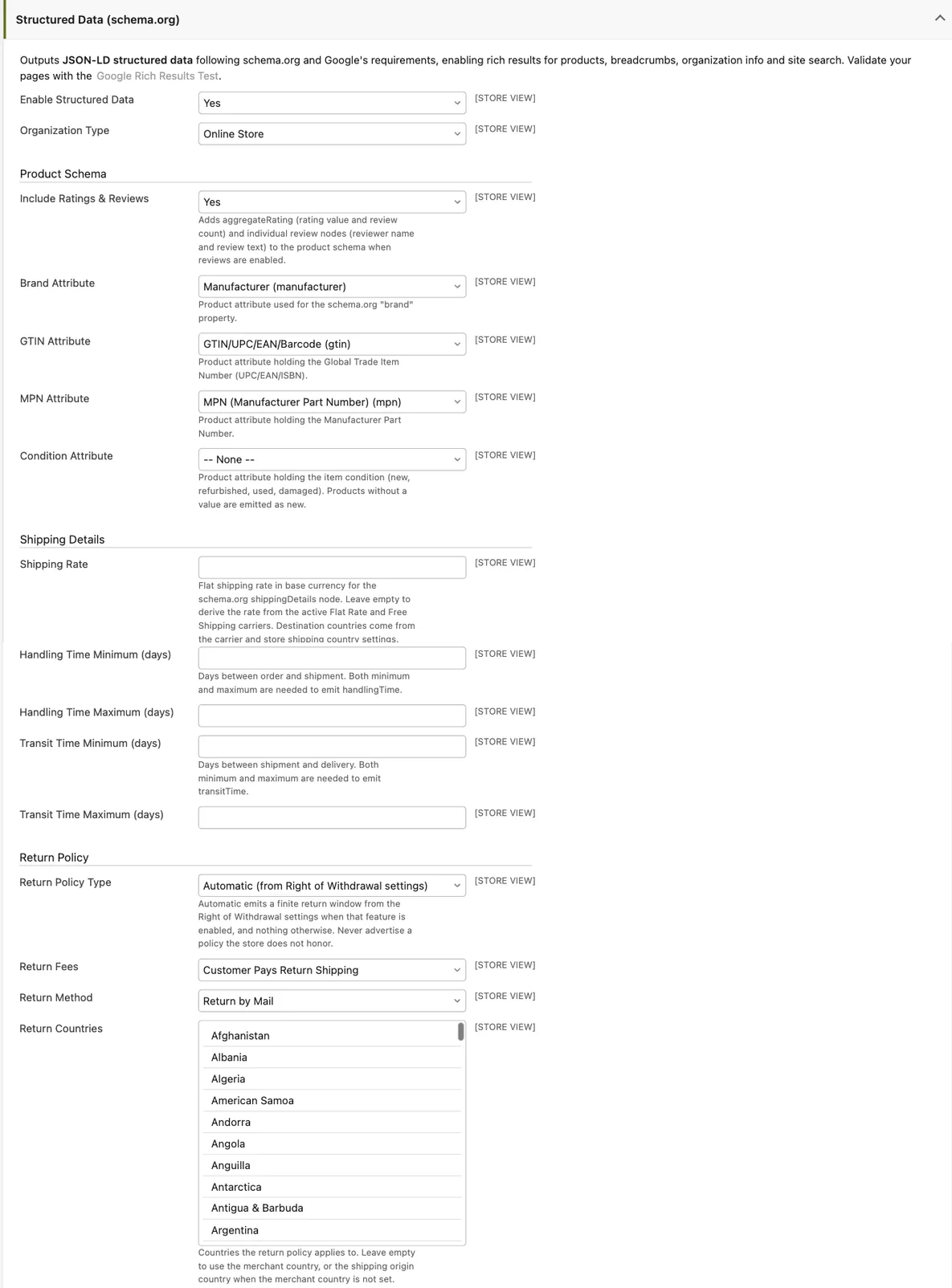
The upper part decides the identity of the product: the organization type, whether reviews are included,
and which catalog attributes hold brand, GTIN, MPN and item condition. These are mappings: if your brand
attribute is called produttore and not manufacturer, this is where you say so.
The stars, precisely
The stars depend on Include Ratings & Reviews, which adds the average rating with its review count and the individual reviews with reviewer name and text. For them to appear three things must be true: the option is on, the reviews module is active, and the product has approved reviews.
There is no shortcut. A store with no reviews has no stars, and inventing an average is the fastest way to lose rich result eligibility for the whole site. Reviews are content, not a setting.
⭐ A starry note: the stars are the only part of this article a customer actually notices. The rest of the markup works in silence, which is exactly why it gets forgotten.
The price has to be the one on the page
Since 26.9 the emitted price follows the display currency and the tax display mode set in Sales > Tax > Price Display Settings. A store showing prices excluding tax now emits excluding tax prices, and that is what Google demands: the structured data must match the number printed on the page.
Every offer also carries priceValidUntil with a precise logic: a special price with an end date emits
that date, a special price scheduled for the future caps the regular price validity at the day before it
starts, and otherwise a rolling thirty day margin is used.
If the store also submits a feed to Google Merchant Center, those two numbers have to stay aligned. A page and a feed saying different things is the case where the merchant meets warnings they cannot read, and the diagnosis always starts with comparing the two.
Identity, condition, seller
Brand, GTIN and MPN come from the attributes you mapped, and a product with no value in that attribute
simply omits the field. The GTIN lands in the length-specific property, gtin13 for thirteen digits, and
stays the generic gtin when the digit count is not one of the expected ones. Maho does not compute the
check digit: Merchant Center remains the validator.
Item condition is new in 26.9 and only matters to whoever sells used, refurbished or damaged goods. A
product with no value, or with an unrecognised one, is declared new, so a store selling only new goods has
nothing to do. The seller, meaning seller, is the organization node, so it takes its name from Store
Information.
Shipping and returns: only when they are true
Two groups that make the difference between a result with price, availability and shipping and one without. Maho does not invent: the shipping node is emitted only when it can state an honest rate and a real destination.
The rate resolves in order: the Shipping Rate field when filled, then the Free Shipping carrier when the product price clears the threshold, then the Flat Rate with its handling fee, and otherwise no node at all. A store using only table rates or live carrier rates has no single honest per-product rate, so if the node matters it has to fill the manual field.
Handling and transit times are emitted only when both the minimum and the maximum are filled: half a value is not enough, and it is the most common reason a field that looks filled never shows up.
The return policy in Automatic mode derives from the revocation button: when that feature is on and the cooling off period is above zero, the markup declares a window of that many days. When the feature is off, nothing is emitted, because a store must not declare a policy it does not honour. The manual alternatives are a fixed window, an unlimited one, returns not permitted, or no policy at all.
⭐ A starry note: a return policy in markup is a merchant statement, not a label. When the terms and conditions change, the setting changes with them.
Variants of configurable products
A configurable emits ProductGroup with hasVariant, the markup Google chose for variants: the parent
becomes a group with its productGroupID and the properties it varies by, and every enabled variant, up to
a hundred, becomes a node with its values, its own image and the link back to the group. When a variant has
a page of its own, the markup carries its URL too.
One detail worth knowing: the variant offer declares the price the customer actually pays, meaning the parent price plus the option adjustments. The variant’s own price attribute is not declared, because the checkout never charges it.
When a field does not show up
The list of cases is short and always the same. The whole block is missing when the module is off or the configuration cache is stale. Brand, GTIN and MPN are missing when the attribute is not mapped or the product has no value. Shipping is missing when no rate or no destination resolves, and never appears on virtual and downloadable products. The return policy is missing in automatic mode when the revocation button is off. Variants are missing when the product is not a configurable or has no enabled variants.
⭐ A starry note: before calling the module broken, flush the configuration cache. Half the reports on this subject end right there.
The working sequence
- Check that the module is on and that brand, GTIN and MPN point at the real catalog attributes.
- Fill Store Information with name and country, which feed the seller and the returns.
- Check the shipping origin and the served countries; if you use table rates, consider the manual rate field.
- Fill both ranges of the handling and transit times, if you promise those times.
- Pick the return policy that matches your written terms.
- Save, flush the configuration cache and validate a product page with Google’s rich results test.
For developers there is one more thing: every JSON-LD graph passes through an event before it is printed, so a module can enrich or suppress the output without overriding templates. That is where a company attribute joins the markup without touching the core.
Text prepared with the help of AI and checked against the source before publication. It can still contain mistakes: if you find one, report it.Read the manifesto
Does your store still sell?
Tell us where you are starting from: we reply with a first assessment, no strings attached.
Ask for the store assessment