
Maho 26.9.0: a new storefront, social login and a store agents can work with
Release 26.9.0 rebuilds the storefront on Tailwind 4 and daisyUI 5 with eleven themes, and adds social login, WCAG scanning, MCP, Markdown and OTel.
Earlier releases mostly rebuilt something inside Maho. 26.9.0 changes the first thing a shopper sees, and around it adds what a store today is expected to have built in: sign-in with the providers people already use, an accessibility check, a real job queue, request tracing and a store that AI agents can read.
A new storefront, with no build step
The base design package is a compiled Tailwind CSS 4 and daisyUI 5 skin, and it is what
a fresh install shows. On top of it come eleven themes, one per kind of shop: neutral,
fashion, electronics, food, books, jewelry, beauty, home, sports, kids and garden. Each one is a
finished storefront with its own type, palette and rhythm, and every one except food and kids,
on purpose, ships light and dark. A theme is about a hundred lines of theme.css, so design
tokens and a few rules, not a forked template.
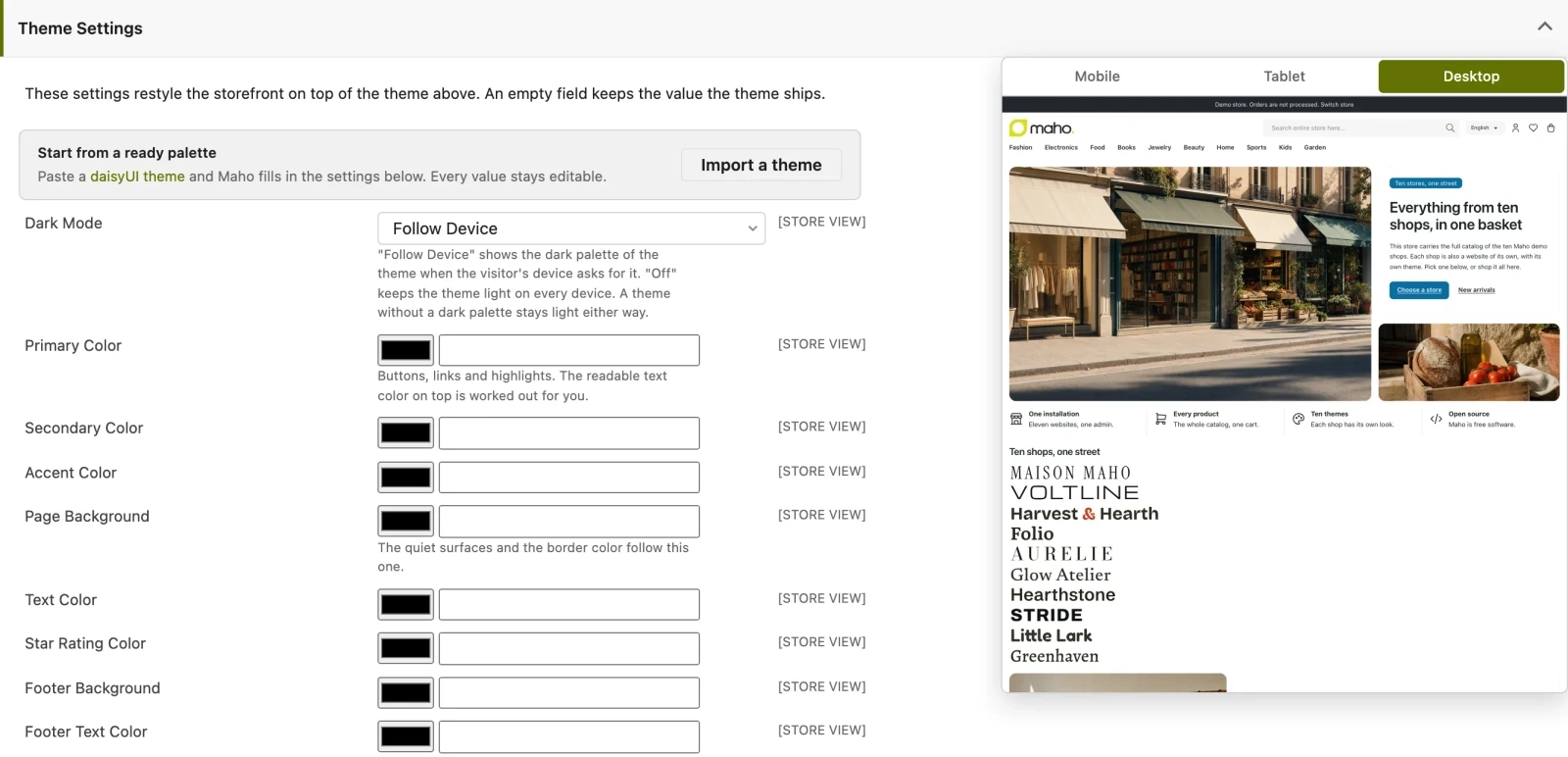
The part that matters if you do not write code is Theme Settings, under System > Configuration > Design: colors, fonts, radii, border width, control size, flat or raised surfaces and a custom CSS box, per website or per store view, with the storefront repainting in a preview pane while you type. Paste a daisyUI theme and Maho fills the form in; an empty field keeps the value the theme ships. Nothing is compiled and nothing is deployed: a merchant restyles the shop from a form. The step by step is in the guide to storefront themes and style.
For developers there are three commands: ./maho dev:frontend:theme:build compiles a theme (with
--theme and --watch), dev:frontend:theme:create scaffolds a new one, and
dev:frontend:theme:export writes the admin settings out as a theme.css.
Sign in with Google, Apple and Facebook
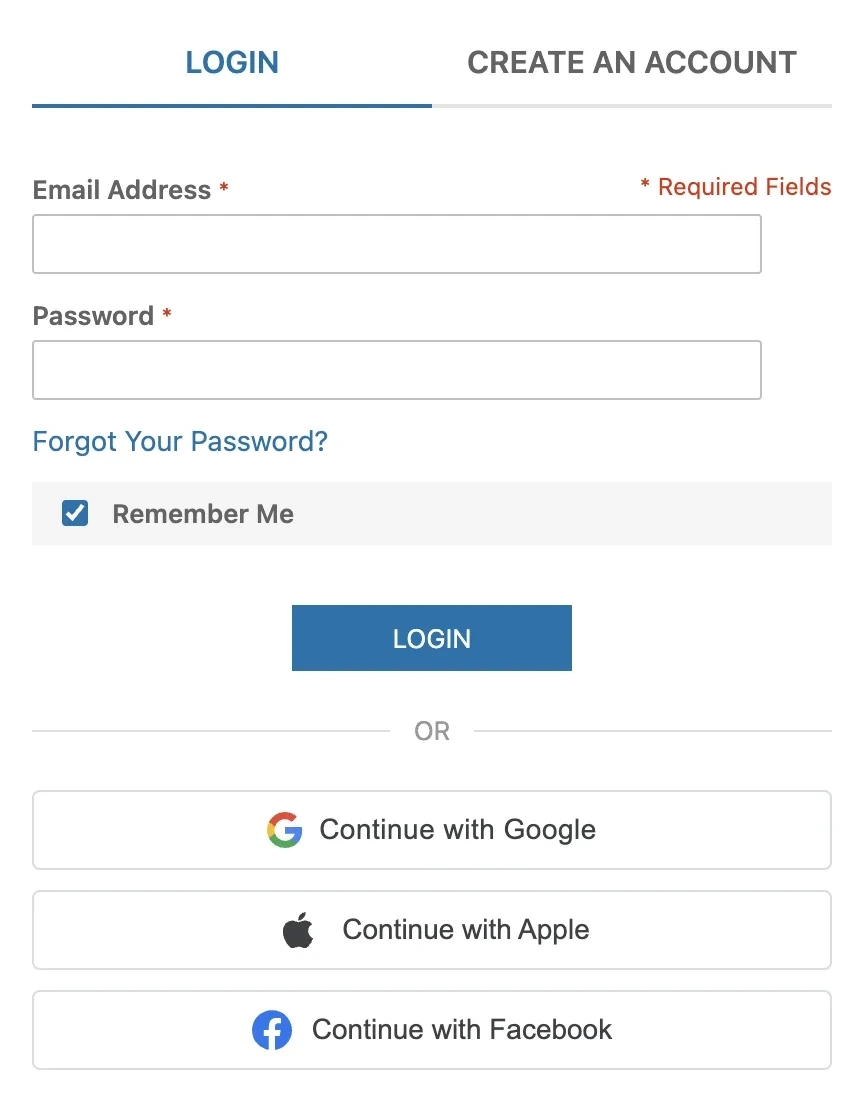
Social login is in the core. An account with the same provider-verified email is linked automatically; otherwise a new account is created, if Allow New Accounts via Social Sign-In allows it, and a customer with missing required fields is sent to complete them. Sign-in follows the Magic Link flow, including the two-step challenge, and the guest cart merges into the account. Identities are website-scoped and can be unlinked from Connected Accounts in the customer area or from the Social Login tab on the customer in the admin.
Accessibility checks run from the admin
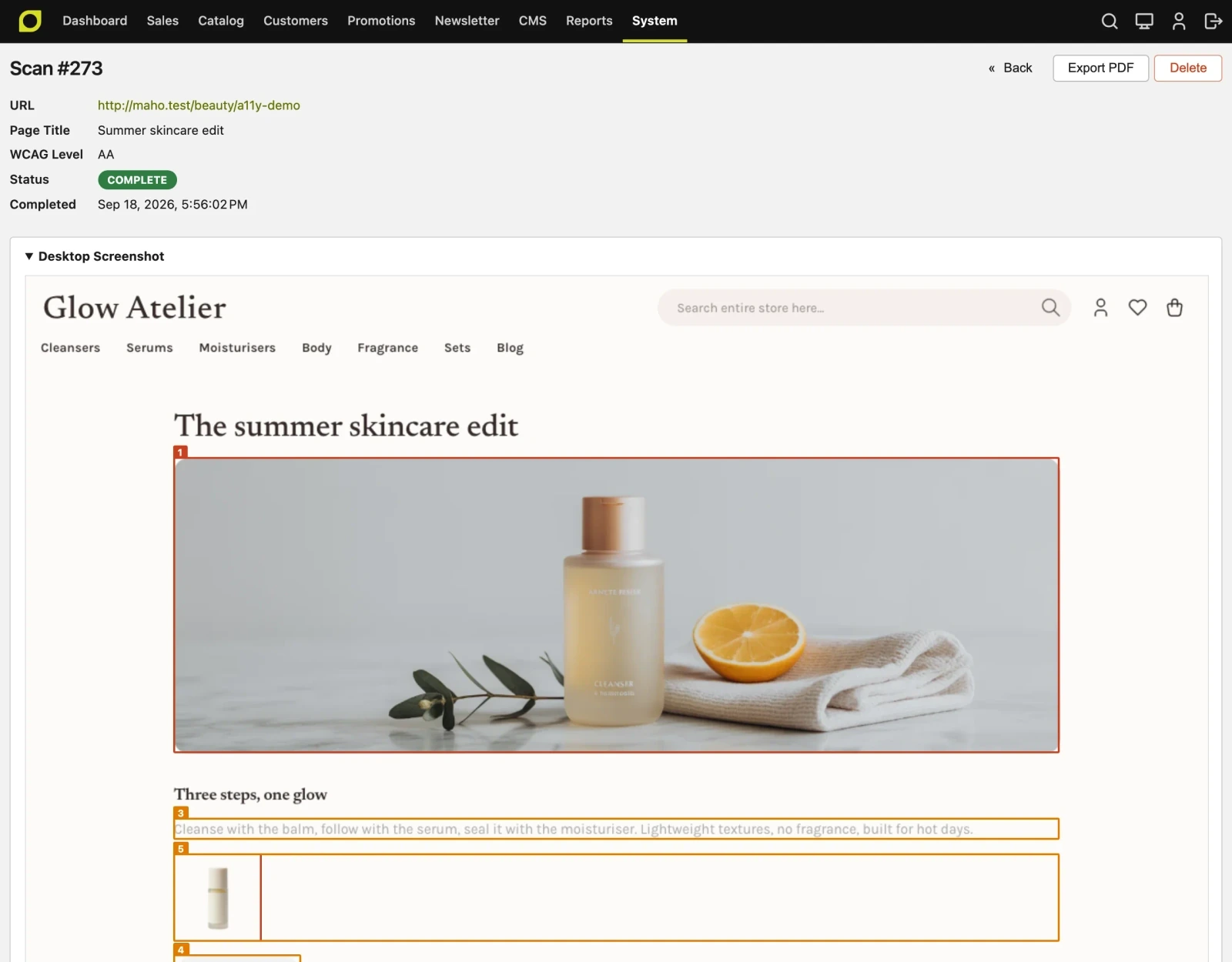
An accessibility audit used to mean an external tool, a PDF and a developer guessing which template produced line 4 of the report. The scan module runs the check from the admin, against your own pages, at the WCAG level you pick, and returns the violations numbered and outlined on a screenshot of the page.
AI agents can work with the store
The MCP server is opt-in under System > Configuration > Services > API, like the other
protocols, and answers on POST /api/mcp. Paste the store address into Claude, ChatGPT or any
MCP client, sign in to your own admin in the browser, approve the connection, and the agent works
with the catalog and the orders. Tools come from the same resource metadata that drives REST and
GraphQL, so every resource becomes a set of tools with no per-tool wiring: 201 tools on a
default install. A call goes through the same pipeline as the matching REST request, with
permissions, admin ACL, the write log and rate limiting. The whole picture, crawler rules and
Markdown pages included, is in the deep dive on
MCP and a store agents can read.
Two things arrive on the storefront side:
- Per store view
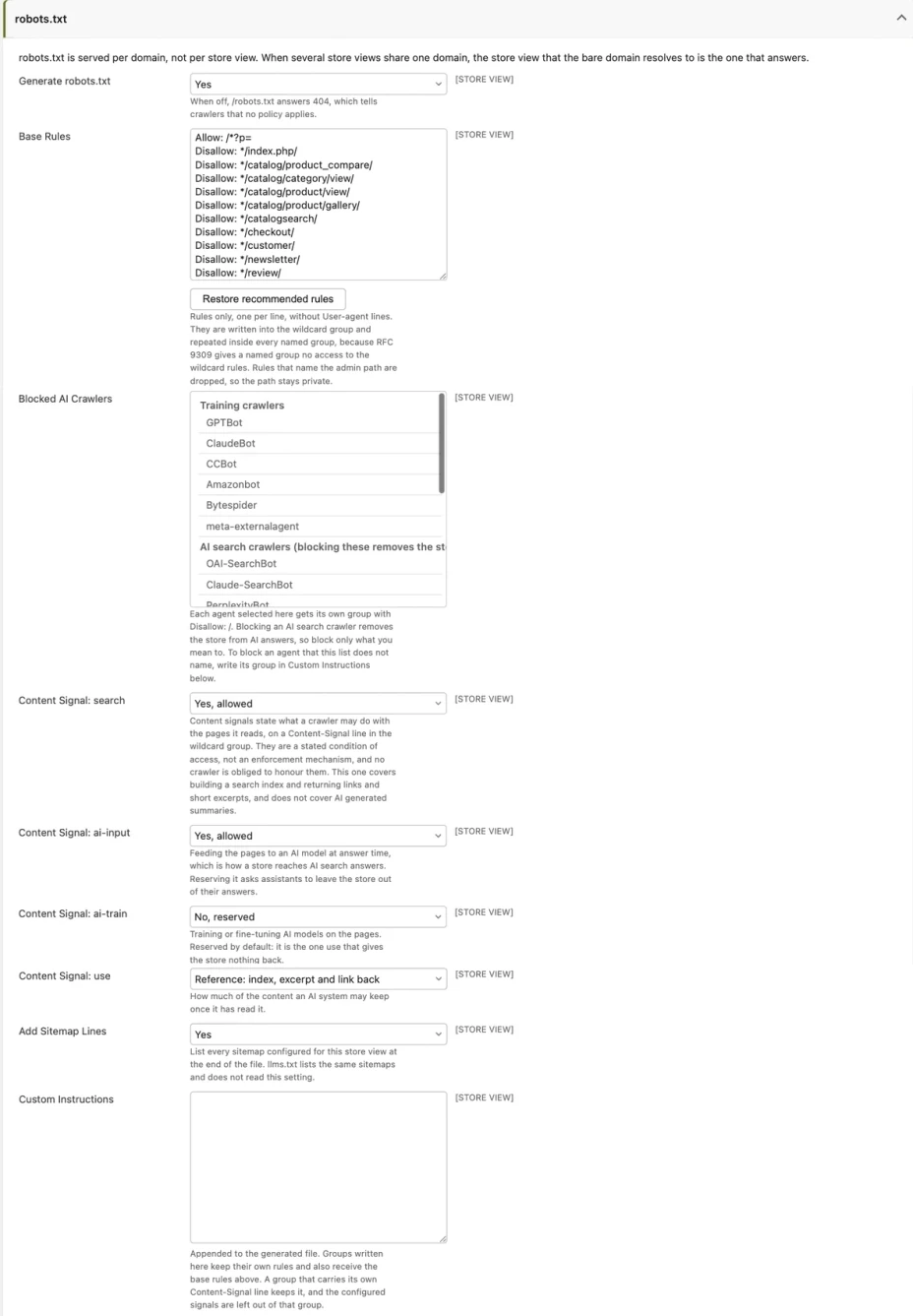
robots.txt, in the new General > Crawlers & AI Agents section. The base rules are repeated inside everyUser-agentgroup, because under RFC 9309 a group such asGPTBotinherits nothing from the wildcard and would quietly expose everything. Blocked agents are grouped by purpose, so the store can stay in AI answers while training bots are kept out. llms.txtandllms-full.txt, with store name and description, locale, currency, CMS pages, blog, top-level categories, the search URL and the sitemaps, plus a markdown block the admin can edit.
Pages also answer in Markdown
An agent that reads a product page as HTML pays for navigation, scripts, styles and tracking
before it reaches the product, and still has to guess where the price is. Maho now answers in
Markdown instead of HTML when an agent asks for it, on the same URL: the Accept: text/markdown
header is enough (Claude Code sends it by default), or .md appended to the address, so
/women/ becomes /women.md. Browsers and search engines keep the HTML page.
The Markdown is not a dump of the page:
- a product gives name, SKU, price (with the regular price when a special price applies), availability, brand, GTIN, image URLs, description, attributes, and one row per option of a configurable or grouped product with its own price and availability;
- a category gives the description and the first 100 products as a table with link, SKU, price and availability, and points to the XML sitemap for the rest;
- CMS pages and blog posts give the title and the content converted to Markdown, with the template directives resolved.
Every HTML page announces its Markdown version with Link: rel="alternate", the Markdown answer
is noindex, and the output is cached per store and currency. It is on for catalog, CMS and blog,
and it can be narrowed or switched off.
A job queue and tracing, without new infrastructure
One job queue, with retries, backoff, error handling and a grid under System > Message Queue. No new infrastructure: everything runs on the database and the cron the store already has. Email goes through it: every transactional message and every newsletter batch is queued and sent by a worker, so cron has to be running; in production supervisord or systemd is the recommended choice.
OpenTelemetry is native and speaks OTLP, so it plugs into any backend that ingests it: Grafana
Cloud, Sentry, Datadog, New Relic, Honeycomb, Elastic APM, Dynatrace, Jaeger, SigNoz, Axiom,
Better Stack or a self-hosted collector. No vendor-specific code and no module per vendor. It is
off by default and three fields under Developer > OpenTelemetry, or the usual OTEL_*
environment variables, are enough to start.
What to know before upgrading
26.9 brings structural changes, and some of them ask for a choice or an extra step. They are all in the release upgrade guide; these are the points to have in mind.
- Email goes through the queue: cron has to be running, so the worker can send it.
- MySQL runs in strict SQL mode: every connection pins
STRICT_TRANS_TABLES,NO_ZERO_DATEandONLY_FULL_GROUP_BY(not on MariaDB), and a value that used to be truncated now returns an error. Legacy0000-00-00dates are checked with./maho health-check --check-zero-datesand fixed with./maho legacy:fix-zero-dates. ./maho migrateconverts every MyISAM, MEMORY and Aria table to InnoDB, third-party tables with your prefix included, so on large tables plan a window: theALTERs can take a while.- Website prices derive from the default price and the rate, instead of being converted copies.
Rows already saved stay and count as merchant prices: review them with
./maho catalog:price:website-overrides. - FedEx moves from SOAP to REST: after the upgrade an OAuth2 client id and secret go in the carrier settings.
- The theme:
base/defaultnow ships the Tailwind skin and the oldstyles.css,checkout.css,blog.cssandonestep-checkout.cssmoved to thelegacypackage. To keep the previous look, set<parent>legacy/default</parent>. - Admins sign in again once, because admin sessions move to a new storage keyspace. Customer sessions are not affected.
- The AI configuration moves from
maho_aitoai, with the tables renamed accordingly;./maho migratemoves rows, config and ACL, and code that readsmaho_ai/...needs an update. - The customer RSS order feeds leave the core, and gift cards belong to several websites.
- Weight unit: Feed Manager feeds export the weight after you pick General > Locale Options > Weight Unit.
The release deprecates several APIs, including the admin secret key, session ids in URLs and HTMLPurifier as a dependency: the upgrade guide says case by case what to use instead.
How to upgrade
The upgrade follows the usual Maho path, and the 26.9.0 release notes are the source to keep open
while you work. Before touching production, try it on a copy, check that cron is running and that
exec() is not disabled, and have a plan for the theme if the store used the previous look.
Anyone who wants to see the themes without installing anything can click through them on the demo store and in the theme gallery on the MahoCommerce site.
Text prepared with the help of AI and checked against the source before publication. It can still contain mistakes: if you find one, report it.Read the manifesto
Source: Release 26.9.0
Does your store still sell?
Tell us where you are starting from: we reply with a first assessment, no strings attached.
Ask for the store assessment